What is Cron and Cron Job
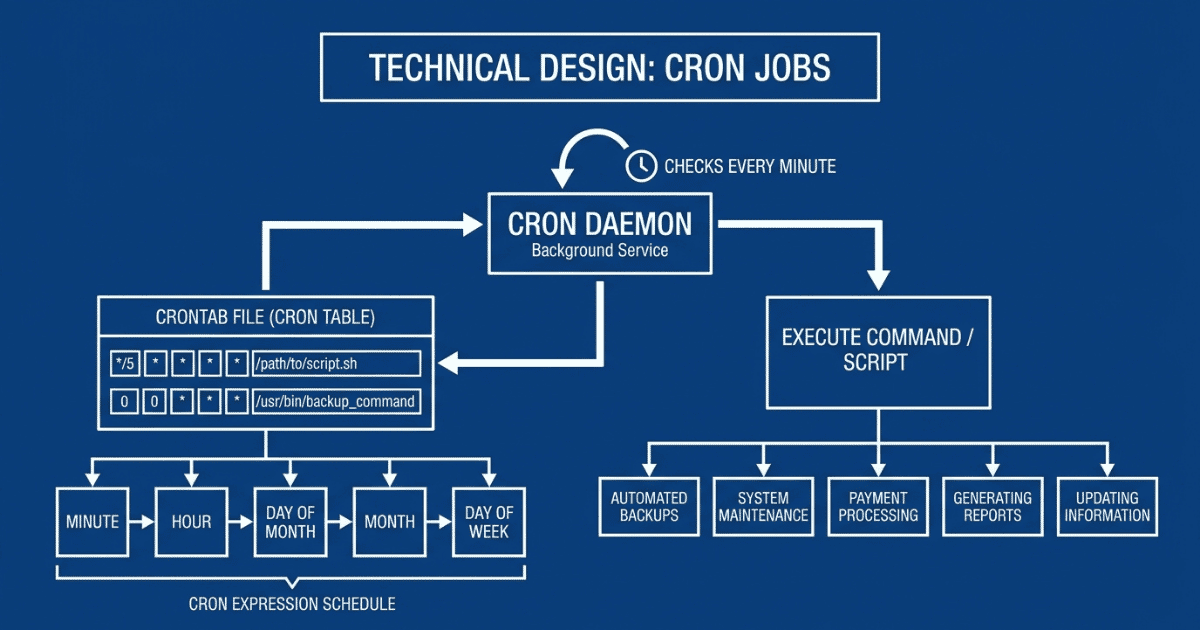
Table of Contents
Cron is a computer program that runs a command (often a shell script or compiled binary) repeatedly at set intervals, indefinitely. You create a schedule for cron jobs using a cron expression, which tells the program when to execute the command or job. You can write a cron expression to run jobs at any frequency, from every minute to once a year.
Explore how you can run cron jobs on Daestro
How Cron Works
cron comes pre-installed in most Linux and Unix operating systems, it runs as a daemon (background service) which checks crontab (cron table) every minute for scheduled jobs and executes them as per their schedule.
crontab short for “cron table”, holds the entry for jobs that are to be run by cron. The format of a crontab entry looks like this:
*/5 * * * * <command>crontab entry given above will execute the command every 5 minutes.
crontab entry consists of 2 parts, first part is “cron expression” which tells cron the schedule for the job to run. The second part is the command that gets executed, like calling a script or a compiled binary program.
Adding entry to crontab
You can access crontab by entering below command, if you are accessing crontab for the first time then you will have to select your editor of choice.
crontab -eThen you will see something like this, here you can add your entry.
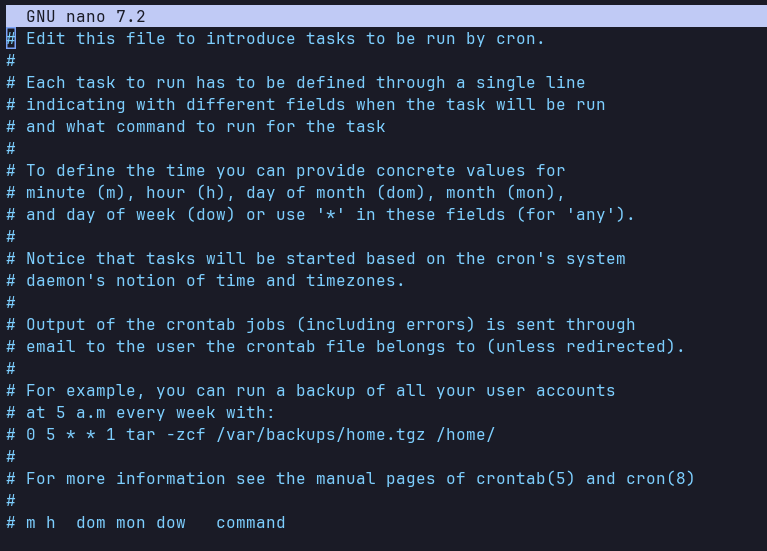
There are different entry for root and user level crontab. Jobs defined in root crontab will run with root privileges while the one defined in user’s crontab will run as that user. You can access crontab for root user using sudo.
sudo crontab -eCron Expression
A cron expression is a string of five to seven fields separated by spaces that dictates exactly when a job should run.
Example of Cron Expression: The expression below makes the cron job run every hour at exactly minute 0.
0 * * * *
| | | | |
| | | | +----- Day of the Week (0 - 6) (Sunday is 0)
| | | +------- Month (1 - 12)
| | +--------- Day of the Month (1 - 31)
| +----------- Hour (0 - 23)
+------------- Minute (0 - 59)- Minute: Set a number from 0 to 59. For example, entering “15” means the task will run at 15 minutes past the hour. “*/5” means every 5 minutes.
- Hour: Value must be from 0 to 23. This uses a 24-hour clock, where 0 is midnight, 12 is noon, and 20 is 8:00 PM.
- Day of the Month: Set a number from 1 to 31. This specifies the exact calendar date you want the task to run, such as the 1st or the 15th.
- Month: Set a number from 1 to 12, where 1 stands for January and 12 stands for December. You can also use the first three letters of the month, such as JAN or OCT.
- Day of the Week: Set a number from 0 to 6, where 0 stands for Sunday, 1 stands for Monday, up to 6 for Saturday. You can also use three-letter abbreviations, such as SUN or FRI.
You can even set multiple values for a field by separating value by comma. Below expression will execute the job every hour, at minutes 0 and 30, but only every 6 hours (specifically at 12:00 AM, 12:30 AM, 6:00 AM, 6:30 AM, 12:00 PM, 12:30 PM, 6:00 PM, and 6:30 PM).
0,30 */6 * * *Cron Expression Examples
Runs every 5 minutes
*/5 * * * *Runs every 10 minutes
*/10 * * * *Runs every Monday at midnight
0 0 * * 1Use Cases of Cron Jobs
Cron satisfies scheduling needs for performing recurring jobs in the easiest way possible, this makes its uses endless. Below are some of the use cases of cron listed:
Batch Jobs
One of the most common use case is using cron to trigger batch jobs at a certain time of day or on a specific date. Batch jobs run a bunch of similar tasks all at once.
Daily Automatic Backups
The desired way to do database and file backup is when system is under very light to no use, this reduces service disruption. Depending on the type of product, such instance naturally occurs at certain time of the day when there are less number of users using it. Cron is excellent and heavily used choice for such jobs where we need to automate database backup.
System Maintenance
Another most common use of cron is cleaning up and updating system routinely to keep it efficient. Most Linux systems generate logs for all kinds of things, eventually all these logs over time adds up and they take significant chunk of storage. Therefore, it is important to clean them up routinely.
Similarly, cron is used in keeping operating system and software of your machine up to date, which is required to keep your system secure and bug free.
Processing Payments
Most payments for invoice, payroll and subscriptions are processed on certain dates, cron like system is used to automate those to happen on desired date and time.
Generating Reports
Organizations often need daily updates on the previous day’s data, such as sales figures, website analytics, or payments made and received. These tasks are automated using cron to run the jobs on a nightly basis.
Updating Information
Fetching the latest weather or stock price data every 30 minutes or so to keep the website updated is also most common use case for cron.
Conclusion
With their ease of use and powerful scheduling methods, cron jobs are the backbone of modern infrastructure. They are used for all sorts of tasks, ranging from the most menial to the most critical. Daestro lets you create cron jobs to trigger job based on the desired schedule. With BYOC model of Daestro you can run cron jobs on your own cloud accounts.