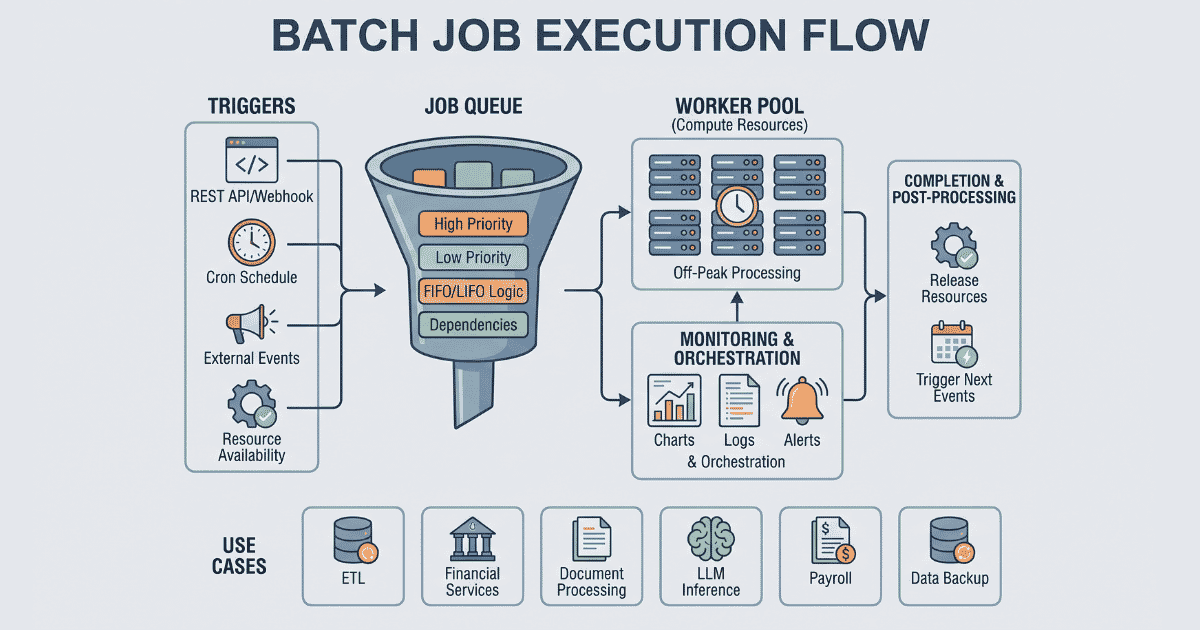
Batch jobs are a way to run repetitive and similar types of compute work all at once at a given period of time, such as doing end-of-day (EOD) report generation. These jobs are mainly scheduled for off-peak hours to avoid overloading the computer systems.
Batch jobs are opposite of real time processing, suppose you go and buy coffee with your credit card, although it may seem that the payment is processed and transaction is completed in real-time however banks process these payments later with the receiver’s bank in a (nightly) batch job.
This is because there are millions of similar transactions happening on any given day, so doing these kind of settlements immediately is not only unfeasible but also waste of resources. Instead batching these similar settlements based on the merchant’s bank will result in much better resource utilization.
Components of Batch Jobs
Job Queue
Job queue holds the job until the necessary compute resources become available or its scheduled execution time is reached. There can be multiple job queues with different levels of priority that enables workers to process high priority jobs first. Inside the job queue itself you can execute jobs based on FIFO or LIFO. If job depends on another job then they will be triggered after parent job finishes.
Trigger
A trigger is an event which activates the job execution, it could be calling a REST API, webhook, etc. For something like cron jobs, the set schedule acts as a trigger for the job to execute. Cron jobs are an excellent way to trigger jobs without user interaction.
Examples of triggers:
- REST API
- Webhook
- Cron jobs for non-interactive repeatable jobs
- One time pre-scheduled job execution
- Availability of required compute resources
- External events
- New file upload on object store
- Github events such as commit pushed
- Item pushed into SQS, etc.
Monitoring
While a job is running, its status can be monitored. It could be something as simple as if its running or completed. For more detailed monitoring, it can include server metrics such as cpu, memory and gpu usage, logging for debugging or monitoring purpose.
Since batch jobs are almost always non-interactive, it should be monitored by the orchestrator to keep track of its status, metrics and logs, so that when something goes wrong it can be debugged and fixed.
An alerting mechanism can be attached to monitoring so that admin can be notified in real time if something goes south.
Completion
After job is completed, it can trigger another set of events, such as releasing of resources, or triggering another set of jobs which might depend on results of this job.
Real World Use Cases of Batch Jobs
Data Engineering
Data Engineering is the process of refining raw data into an intelligible form that can be used to analyze certain behaviors. Organizations track user actions and then convert them into business insight using data engineering.
Data engineering is 3 step process known as ETL (Extract, Transform and Load). Most ETL process runs using batch jobs at the end of day, when enough data is aggregated to process.
Financial Services
Financial institutions make use of batch jobs to calculate interest on various types of deposits, performing ACH, calculating net amount to transfer to another banks, etc. The frontend of banking apps may make you feel like money is transferred instantly however banks settle these kinds of transactions nightly in a batch job and only move the net amount among other banks.
Document Processing
Batch jobs are used in automating repetitive and high volume document workflows such as parsing bank statements, reading medical records, creating invoices, reading claims for insurance company, etc.
LLM Inference
GPUs are expensive and scarce, which makes LLM APIs costly. To reduce costs, most AI providers allow the user to submit the request in batch, which returns the request ID and not the actual LLM output. Since the actual response is calculated at a later time when GPUs are at lower demand, user can use the request ID to poll for LLM output.
Payroll Processing
Companies pay their employees bi-weekly or monthly. They have to process large number of payments at once, here batch jobs are used to calculate total payable amount and process the payments through partner banks.
Data Backup
Scheduled backups of databases and file systems are often run as batch jobs during the night (off-peak hours).
Challenges and Drawbacks
While batch jobs are resource efficient, they come with their own tradeoffs, do consider below mentioned drawbacks before making a decision:
Latency: Since batch jobs are run at a later time and with multiple similar tasks, the results are not immediately available.
Debugging Complexity: Debugging a failed batch job is not that easy, it’s almost like finding a needle in haystack. When a batch job fails halfway through millions of records, finding the exact cause and figuring out where to resume is difficult.
The Thundering Herd Problem: If concurrency of spawning new jobs is not regulated properly then running too many jobs which depend on the same resource can cause the overload and may crash the system.
Best Practices For Writing Batch Jobs
Idempotency: Idempotency is the property where the operation should safely resume without performing duplicate actions. Keeping batch jobs idempotent makes them retry safe.
Chunking / Pagination: Instead of processing millions of records at once, processing data in smaller and manageable chunks makes debugging faster in case of failure, keeps memory usage predictable and makes retries faster.
Dead Letter Queues (DLQ): If a job fails more than set number of times, then it should be isolated and moved to a DLQ for manual inspection, allowing the rest of the batch to complete successfully.
Batch vs Stream Processing
In modern architectures, batch jobs are often compared to stream processing. While batch processing handles large volumes of data at rest during scheduled intervals, stream processing handles data in real-time.
For example, a stream processing system (like Apache Kafka) is perfect for analyzing a credit card swipe for fraud in milliseconds. However, aggregating all of those daily swipes to calculate the merchant’s final payout is best left to a nightly batch job.
Modern Tools and Orchestrators
Because batch jobs run in the background without user interaction, they require robust orchestration tools to manage queuing, scheduling and scaling resources.
Historically, developers relied on basic cron jobs, but modern workloads require more visibility. Popular open-source tools include Apache Airflow for complex data pipelines, and framework-specific background workers like Sidekiq or Celery. Cloud providers also offer managed solutions like AWS Batch.
However, managing the infrastructure for these orchestrators can quickly become a bottleneck of its own. Daestro is a modern container orchestrator which can run cron and batch jobs on any cloud provider with BYOC and manage the infrastructure based on the requirement.
Conclusion
Batch jobs are a foundational piece of workload automation. By grouping repetitive tasks and processing them during off-peak hours, organizations can drastically improve their resource utilization, handle massive datasets, and save on compute costs. Whether you are running ETL pipelines, processing payroll, or queuing LLM inference, batch processing remains indispensable.
Looking to simplify your workload automation?
Managing job queues, configuring retries, and monitoring infrastructure shouldn’t take time away from building your core product. Check out how Daestro can streamline your background jobs and orchestrate your workloads with ease.
Using Daestro, you can run batch jobs on:
Self-hosted/On-prem compute
AWS
Akamai Cloud (Linode)
DigitalOcean
Vultr